Showing posts with label Google. Show all posts

Sunday, May 15, 2011

Philippines 'The Social Networking Capital of the World'


24/7 Wallst.com released the list of ' TopTen Nations' who uses the Social Networks the most. Philippines tops the list, therefore our Nation was dubbed as  the social networking capital of the world. According to the article the ranking data was drawn from comScore, Inside Facebook, New Media Trend Watch, and ZDNet. These data include percentage ranking on three well known social networking sites: Facebook, Twitter, and Linkedin. It is only in Linkedin that the Philippines ranked lower as the Filipinos, I supposed are not yet exposed on the said site but knowing the techie 'Pinoys' they will conquer the same eventually the soonest! 

Tweet and Share this article if you like it! Subscribe to our e-mail feeds at the bottom of the page and/or Like  and follow us on Facebook and Tweeter. for daily updates.


"Social network penetration is incredibly high in the Philippines, reaching 95%. Facebook is the country’s most popular website, more so than Google, and has a penetration rate of 93.9%. The Philippines is also the eighth most popular country for Twitter use on a global scale, with a penetration rate of 16.1%. The popularity of photo sharing has increased by 46% in the country in one year, largely due to Facebook. Social networking is so popular among Filipinos, the country has been nicknamed “The Social Networking Capital of the World."


The following are the actual top ten ruling nations:

1. Philippines
 Facebook: 93.9%
Twitter: 16.1%
LinkedIn: 1.9%

2. Israel
Facebook: 91.0%
Twitter: 5.0%
LinkedIn: 6.4%

3.Turkey
Facebook: 90.9%
Twitter: 16.6%
LinkedIn: 3.4%

4. Chile
Facebook: 90.2%
Twitter: 14.3%
LinkedIn: 5.9%

5. Argentina
Facebook: 89.2%
Twitter: 18.0%
LinkedIn: 6.4%

6. Malaysia
Facebook: 88.4%
Twitter: 10.8%
LinkedIn: 2.9%

7. Indonesia
Facebook: 87.5%
Twitter: 22.0%
LinkedIn: 1.3%

8. Peru
Facebook: 87.2%
Twitter: 12.5%
LinkedIn: 4.6%

10. Venezuela
 Facebook: 86.2%
 Twitter: 21.0%
 LinkedIn: 3.2%

Most of the countries included on the list were developing countries, none of the G8 countries is included in the top 10 list.

Friday, May 13, 2011

Blogger Unavailable on May 12 and 13- caused panic on bloggers around the wolrd!

How to fix bX-rmz3p7, bX-d7hq04 and bx-u8tljp,  those are error codes when i enter url for blogger..its showing me error screen with my code. When are they going to resolve this problem? These are some of the questions being asked during the absence of blogger. No blogger update was made yesterday due to some problem-maintenance fixing of blogger engineers, as you noticed all blogs being run by blogspot was reset their post up until May 11, 2011 and posts beyond that were temporarily deleted according to blogger update status.


“Bloggers is currently unavailable. We apologize for any disruption of service. “


As of 4:30pm on Friday (Philippine time), a message dated May 12 said that "Blogger would be in read-only mode for "maintenance."


"Our sincere apologies. We're working hard to restore service, and your loyalty," Blogger tweeted repeatedly.


Status Update "To get Blogger back to normal all posts since 7:37am PT on Wed 5/11 have been temp removed. We expect everything to be back to normal soon," That is why all my post on May 12, 2011 was not visible up until now though you we can already post a new one.


Update Information from The Blogger:
We are very sorry that users are unable to publish to Blogger right now. We have rolled back the maintenance release from last night and as a result, posts and comments from all users made after 7:37 am PDT on May 11, 2011 have been removed. Again, we apologize that this happened and our engineers are working hard to return Blogger to normal and restore your posts and comments. We will post a report once this work is complete.
-The Blogger Team
Hopefully the problem Current Blogger not available quickly resolved.
UPDATE NEWS :


Wednesday, May 11, 2011

Dear Sophie- Google Chrome commercial goes viral

Dear Sophie- Google Chrome commercial goes viral. A father uses the web to share memories with his daughter as she grows up in this video depiction.


Watch the video here!


Music by: Ingrid Michaelson
Song: "Sort Of"
Album 'Everybody'

Tuesday, May 10, 2011

Google celebrates Martha Graham’s 117th birthday, dancing Google Doodle .

Martha Graham is a dancer, so her Google Doodle must dance too, right?


Search engine giant Google is currently celebrating the 117th birthday of American dancer and choreographer Martha Graham using the company’s iconic Google Doodle.
The doodle shows an animation of a dancer performing routines that spells all the letters of Google starting from letter E. The dancer stops after performing the letter G. I recorded the moving Google Doodles for future reference, watch it in the video below.
According to Martha Graham’s Wikipedia entry, she is considered as the “Picasso” and/or “Frank Lloyd Wright” of dancing. The entry also added that Graham invented “a new language of movement, and used it to reveal the passion, the rage and the ecstasy common to human experience.”
Last Sunday, Google celebrated the birthday of English author and illustrator Roger Hargreaves by presenting 16 illustrations that are changing every page reload

Saturday, April 30, 2011

Happy International Worker's Day

Happy International's Labour/Labor Day or most popularly known as Labor Day in Philippines. In Celebrattion of International Worker's Day, Google Doodle change their logo.


International Workers' Day (also known as May Day) is a celebration of the international labour movement and left-wing movements. It commonly sees organized street demonstrations and marches by working people and their labour unions throughout most of the world. May 1 is a national holiday in more than 80 countries. It is also celebrated unofficially in many other countries.

International Workers' Day is the commemoration of the 1886 Haymarket Massacre in Chicago, when, after an unknown person threw a dynamite bomb at police as they dispersed a public meeting, Chicago police fired on workers during a general strike for the eight hour workday, killing several demonstrators and resulting in the deaths of several police officers, largely from friendly fire.In 1889, the first congress of the Second International, meeting in Paris for the centennial of the French Revolution and the Exposition Universelle, following a proposal by Raymond Lavigne, called for international demonstrations on the 1890 anniversary of the Chicago protests.[citation needed] May Day was formally recognized as an annual event at the International's second congress in 1891.

Google Doodle Celebrates 160th Anniversary Of The First World Expo --Today On Google Doodle


Image For Google Doodle Celebrates 160th Anniversary Of The First World Expo
International trade, tourism, education, industrialization and cultural exchange… that’s where it all started – - the first World’s Fair or World Expo.
And the ever so timely Google Doodle reminds us that the idea sprouted in Prince Albert’s (Queen Victoria’s husband) mind exactly 160 years ago, tomorrow.
“Great Exhibition of the Works of Industry of All Nations” it was called, when the exposition was held for the first time in 1851.
Google Doodle Celebrates 160th Anniversary Of The First World Expo
As many as 58 World Fairs have taken place ever since (according to the International Exhibitions Bureau), with the 59th coming up in Yeosu, South Korea, as the Expo 2012 (May 12 to August 12, 2012).
Just so you know, look out for some movement in the Doodle. Also, for in length information about World’s Fair and its history, read this piece.

Monday, April 25, 2011

Google Doodle- Celebrate Audobon

As you can see on your Google Homepage, today Google Doodle celebrates  the 226th birthday of John James Audubon, the great ornithologist and naturalist, famous for “Birds of America.”


Audubon was a French-American ornithologist born on April 26, 1785 in Saint Dominique (Haiti) and died aged 65 in New York. The Google Doodle itself is a simple design of various birds on branches, and the spaces between the birds spell out the word Google although we admit that’s pretty hard to spot. The 435 life-size illustrations for “Birds of America” were hand-painted by Audubon himself and engraved on copper plates and are world-renowned and the book listed 700 North American birds, according to Wikipedia.

Friday, April 22, 2011

Google Celebrate Earth Day's 41st anniversary

If you open Google's homepage you will be greeted by an Eden-like scene of diverse wild animals in their natural habitats.


The first Earth Day was celebrated on April 22, 1970 and was founded by US Senator Gaylord Nelson. The original Earth Day was attended by about 20 million Americans. The Earth Day movement went global in 1990 and is now celebrated in over 175 countries across the globe. April 22 was officially designated as the international Earth Day by the United Nations in 2009. The day is marked to raise awareness and appreciation for our planet's environment.
Happy Earth Day to everyone!

Saturday, February 26, 2011

Perintah Dasar Google


Sebenarnya masih sangat banyak fitur pencarian yang bisa kita gunakan, tapi tidak terdapat di menu pilihan Advanced Search. Dengan kata lain kita harus memasukannya query di form pencarian di Basic Search langsung. Nah permainanquery dan operator pencarian ini yang sebenarnya akan kita bahas di artikel ini.
FITUR PENCARIAN DASAR
  1. AND: Mencari informasi yang mengandung kedua kata yang dicari. Bisa menggunakan salah satu dari tiga alternatif berikut:
    ukiran jepara
    ukiran AND jepara
    ukiran+jepara
  2. OR: Mencari informasi yang mengandung salah satu dari kedua kata. Bisa menggunakan salah satu dari dua alternatif berikut:
    tahu OR tempe
    tahu | tempe
  3. FRASE: Mencari informasi yang mengandung frase yang dicari dengan menggunakan tanda “”. Contoh:
    “perangkat lunak”
  4. NOT: Hasil pencarian mengandung kata yang di depan, tapi tidak yang dibelakang minus (-). Contoh di bawah akan mencari informasi yang mengandung kata ikan tapi bukan bandeng.
    ikan -bandeng
  5. SINONIM (~): Mencari kata beserta sinonim-sinonimnya. Contoh di bawah akan membawa hasil pencarian: kendaraan (car) dan sinonim-sinonimnya.
    ~car
  6. ASTERIK (*): Karakter pengganti kata. Dari contoh di bawah, hasil yang didapat bisa: ayam bakar pedas, ayam goreng pedas, ayam masak pedas, dsb
    ayam * pedas
  7. TANDA TITIK (.): Karakter pengganti huruf, angka dan karakter tunggal. Dari contoh di bawah, hasil yang didapat bisa: kopi, koki, kodi, dsb
    ko.i
  8. CASE INSENSITIVE: Pencarian di Google menganggap kapital dan bukan kapital sebagai sesuatu yang sama. Jadi, romi satria wahono, Romi Satria Wahono, atau RoMi SaTrIA waHoNo akan membawa hasil pencarian yang sama
  9. PENGABAIAN KATA: Google mengabaikan keyword berupa karakter tunggal dan kata-kata berikut: a, about, an, and, are, as, at, b, by, from, how, i , in, is, it, of, on, or, that, the, this, to, we, what, when, where, which, with. Apabila kita masih tetap menginginkan pencarian kata tersebut, bisa dengan menggunakan karakter + di depan kata yang dicari (contoh: Star Wars Episode +I), atau bisa juga dengan menganggapnya sebagai frase (contoh: “Star Wars Episode I”)
  10. I’M FEELING LUCKY: Akan membawa kita langsung menuju ke hasil pencarian pertama dari query kita
FITUR PENCARIAN LANJUT

  1. DEFINE: Mencari definisi dari sebuah terminologi. Dari contoh di bawah, hasil yang didapat adalah berbagai definisi tentang e-learning dari berbagai sumber
    define:e-learning
  2. CACHE: Menampilkan situs web yang telah diindeks oleh Google meskipun sudah tidak aktif lagi. Contoh di bawah akan menghasilkan pencarian kata phppada situs ilmukomputer.com yang ada di indeks Google.
    cache:ilmukomputer.com php
  3. LINK: Menampilkan daftar link yang mengarah ke sebuah situs. Contoh di bawah akan menampilkan daftar link yang mengarah ke situs ilmukomputer.com
    link:ilmukomputer.com
  4. RELATED: Menampilkan daftar situs yang serupa, mirip atau memiliki hubungan dengan suatu situs
    related:romisatriawahono.net
  5. INFO: Menampilkan informasi yang Google ketahui tentang sebuah situs
    info:romisatriawahono.net
  6. SITE: Menampilkan pencarian khusus di suatu situs yang ditunjuk
    java site:ilmukomputer.com
  7. FILETYPE: Menampilkan hasil pencarian berupa suatu jenis (ekstensi) file tertentu. Jenis file yang bisa dicari adalah: doc, xls, rtf, swf, ps, lwp, wri, ppt, pdf, mdb, txt, dsb. Contoh di bawah akan menampilkan hasil pencarian berupafile PDF yang mengandung keyword software engineering
    software engineering filetype:pdf
  8. ALLINTITLE: Menampilkan seluruh kata yang dicari dalam TITLE halaman. Contoh di bawah akan menghasilkan halaman yang memiliki title java programming. allintitle ini tidak dapat digabungkan dengan operator (sintaks) lain. Gunakan intitle untuk keperluan itu.
    allintitle:java programming
  9. INTITLE: Menampilkan satu kata yang dicari dalam TITLE halaman. Contoh di bawah akan menghasilkan halaman yang memiliki title java dan isi halaman yang mengandung kata enterprise
    intitle:java enterprise
  10. ALLINURL: Menampilkan seluruh kata yang dicari di dalam URL. Contoh di bawah akan menghasilkan daftar URL yang mengandung kata java danprogramming. allinurl ini tidak dapat digabungkan dengan operator (sintaks) lain. Gunakan inurl untuk keperluan itu.
    allinurl:java programming
  11. INURL:  Menampilkan satu kata yang dicari di dalam URL. Contoh di bawah akan menghasilkan daftar URL yang mengandung kata java dan isi halaman yang mengandung kata enterprise
    inurl:java enterprise
Pencarian yang kita lakukan akan semakin efektif apabila kita mencoba menggabungkan beberapa operator baik yang ada di fitur pencarian dasar maupun lanjut. Misalnya, kita ingin mencari file-file PDF yang ada di situs www.pdii.lipi.go.id. Maka kita gabungkan dua operator menjadi:
filetype:pdf site:www.pdii.lipi.go.id

Wednesday, December 22, 2010

Cara Mengakali Google Search Engine

Cara mengakali Google search engineCara mengakali Google Search akan burukutuk bahas kali ini. Dengan melakukan pengakalan Google engine ini maka dijamin jumlah visitor blog akan meningkat drastis. Sebenarnya ini adalah salah satu trik SEO, namun dengan sedikit bermain-main dengan om Google. Karena cara ini memanfaatkan bot Google, di mana Google search engine bekerja berdasarkan sistem. Jadi, bisa deh memanfaatkan kelemahannya. Caranya sangat mudah kok. Ikuti saja petunjuk yang ada di sini. . .

Sebelumnya. Akan burukutuk jelaskan bagaimana cara mengakali ini bekerja (Hasilnya) =


Cara mengakali Google Search Engine Teknik SEOhasil penerapan cara mengakali Google Search


Lihat screenshoot di atas? Trik blog Burukutuk mengambil salah satu artikel yang sudah terindeks, dan perhatikan apa yang berbeda. Judul post tittle di depan, baru kemudian tampak judul blog. Pada defaultnya, sebelum diakali, judul blog dulu baru kemudian judul post. Padahal, yang mau kita tunjukkan pada visitor kan judul post? Iya toh?


Nah, langsung aja ke cara membuatnya yuk =


  1. Log in ke account blog
  2. Click layout - edit html (Seperti biasa)
  3. Cari kode di bawah ini (Tekan ctrl + f untuk mempermudah pencarian)

    <title><data:blog.pageTitle/></title>
  4. Setelah itu, anda blok kode di atas dan replace/ganti dengan kode di bawah ini (anak2, tolong ya jangan ribut sendiri)

    <!-- Start http://www.bloggerplugins.org/: Pembuat kode original -->
    <b:if cond='data:blog.pageType == &quot;index&quot;'>
    <title><data:blog.pageTitle/></title>
    <b:else/>
    <title><data:blog.pageName/> ~ <data:blog.title/></title>
    </b:if>
    <!-- End http://b4r12y.blogspot.com -->
  5. Click save


Perubahan akan terjadi setelah blog terindeks lagi oleh Google search berikutnya. Selamat mencoba dan jangan lupa tinggalkan komentar dan bersedekah.

Monday, November 29, 2010

Cara Mencari Wallpaper di Google

wallpaper dg google images
Wallpaper selain sebagai hiasan di desktop komputer, kadang bisa menumbuhkan “semangat baru” ketika bekerja di depan komputer. Tampilan yang monoton (selalu sama) mudah menimbulkan kejenuhan, sehingga terkadang kita perlu tampilan wallpaper yang baru dan segar. Di Internet kita bisa mendapatkan begitu banyak wallpaper.
Salah satu caranya dengan Google Image Search. Bagaimana cara mudah mencari gambar wallpaper dengan Google ?


Sebelumnya saya juga pernah menuliskan tentang Koleksi 120 wallpaper Windows 7 dari 20 Negara yang berisi wallpaper alam dari berbagai negara dengan kualitas yang cukup bagus.
Selain sebagai mesin pencari artikel atau data di website, google juga menyediakan fasilitas pencarian gambar. Meskipun bisa saja kita langsung mengetikkan kata kunci dari gambar yang kita cari. Tetapi jika kita ingin mencari wallpaper yang pas dan sesuai dengan ukuran layar komputer kita (desktop), ada cara lebih baik.
Berikut caranya :
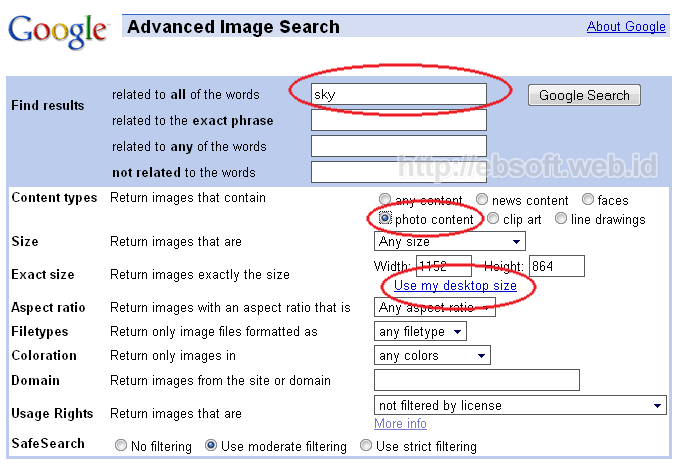
  1. Buka Google Images
  2. Klik link Advanced Image Search ( kalau bahasa indonesia Penelusuran Gambar Lanjutan) yang ada di sebelah kanan tombol Search Images.
  3. Akan tampil Advanced Image Search
  4. Pada isian pertama, isikan kata kunci dari gambar yang di inginkan. Misalnya “sky”
  5. Pada bagian content types, plih photo content
  6. Klik Use my desktop size (artinya kita mencar gambar yang sesuai dengan ukuran desktop komputer kita)
    google-images-search
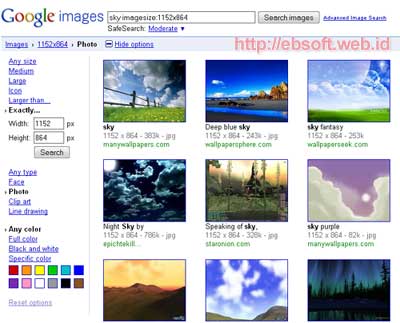
  7. Klik Google Search, untuk mulai mencari gambar yang sesuai.
google-images-search-2
Di Opsi yang tampil, kita juga bisa mencari gambar dengan banyak pilihan (setting), seperti ukuran, tipe file, warna dan lainnya. Jika ingin lebih cepat, bisa juga langsung mengetikkan pencarian di google Images misalnya : sky imagesize:1152x864 ( untuk mencari gambar/wallpaper dengan kata kunci “sky” dan ukurannya 1152×864 pixel).